When we started Growbro, our early customers had a problem we didn't fully appreciate until we lived it ourselves: they were managing customer conversations across five completely separate tools. A Freshdesk tab for website queries. The Meta Business Suite for Instagram DMs. A separate WhatsApp Business app on someone's phone. Messenger notifications pinging on Facebook. And a Slack channel where the team would paste screenshots of conversations to each other asking "has anyone replied to this person?"
It was chaos. And it was costing them real money.
The actual problem isn't "multiple channels"
The surface-level complaint is always "I have too many inboxes." But when we dug deeper with our early beta users, the real pain was more specific:
Context loss between channels. A customer would ask about pricing on the website widget, then follow up on WhatsApp two hours later. The support agent on WhatsApp had zero visibility into the earlier web conversation. So they'd ask the customer to repeat everything. The customer would get frustrated. The deal would die.
Impossible staffing math. If you want to respond within 5 minutes across 3 channels, and each channel gets 20 messages per hour, you need dedicated people monitoring each one. For a 10-person startup, that's not feasible.
No single source of truth for leads. When a conversation on Instagram converts into a genuine lead, someone has to manually copy-paste that person's details into a spreadsheet or HubSpot. It doesn't happen reliably.
How the unified inbox actually works
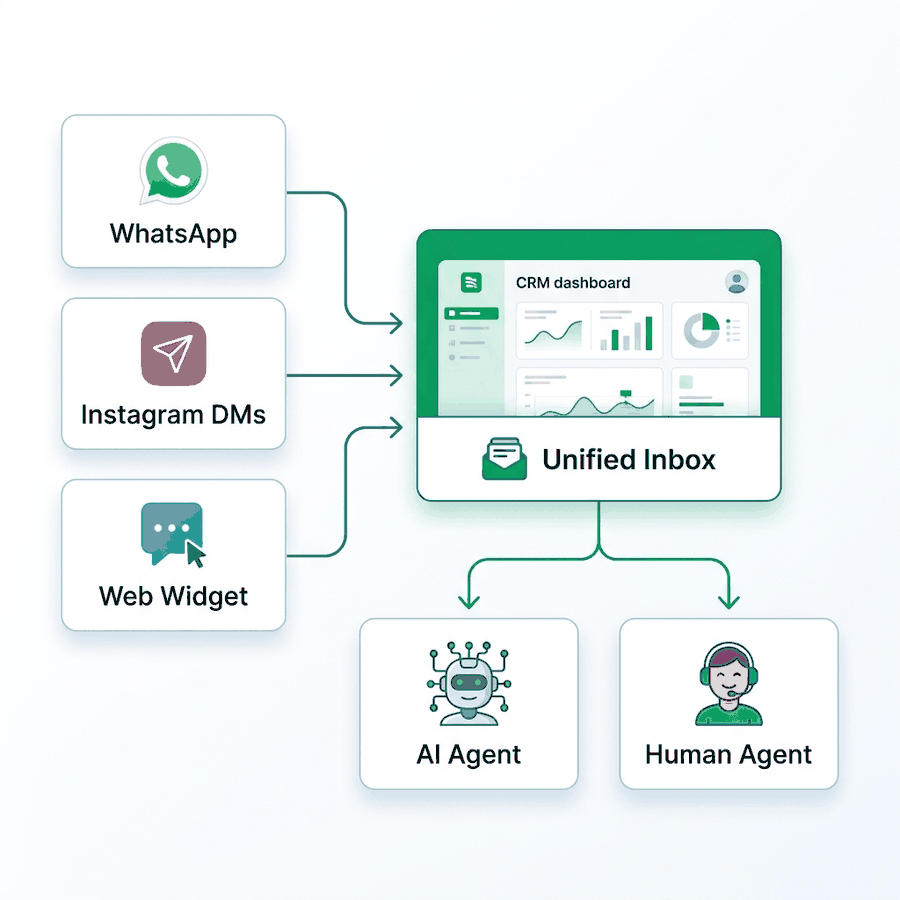
Here's the technical architecture we built to solve this:
WhatsApp connects through the official Cloud API via Meta's Embedded Signup flow. When a business connects their number through our dashboard, we register their WABA (WhatsApp Business Account) and set up webhooks that forward every incoming message to our backend in real-time.
Instagram and Messenger connect through the Facebook Graph API. The user links their Facebook Page and Instagram Business account through our OAuth flow. We subscribe to the messages and messaging_postbacks webhook topics, which gives us every DM and story reply as it arrives.
The web widget is our own JavaScript SDK. It opens a WebSocket connection to our servers, so messages flow in real-time without polling.
All three channels feed into a single conversations table in our database. Each conversation has a channel field (whatsapp, instagram, messenger, web) but from the dashboard perspective, they render identically in one unified inbox. The business owner sees a single chronological feed with a small channel badge on each message.
The piece that makes it actually useful: AI on top
A unified inbox by itself saves you from tab-switching. But the real leverage comes from deploying a single AI agent across all channels simultaneously.
When a business configures their AI agent in our dashboard — uploading PDFs, scraping their website, setting the agent's personality and conversation rules — that configuration applies everywhere. The same trained agent answers a WhatsApp message at 2 AM, responds to an Instagram story reply at lunch, and handles a pricing question on the website widget during peak hours.
The AI handles roughly 80% of routine inquiries autonomously. For the remaining 20% — the edge cases, the angry customers, the complex negotiations — we built a "Pause AI" button. When a human agent clicks it on any specific conversation, the AI immediately stops responding to that particular thread. The human takes over seamlessly, with the full conversation history (across all channels) visible in the same view.
Once the human resolves the issue and unpauses, the AI picks back up for future messages from that contact.
What this means for lead capture
Every conversation, regardless of channel, feeds into our CRM. When the AI captures an email, phone number, or any custom attribute during a conversation, it creates a lead record automatically. That lead is tagged with the source channel, the AI agent that handled them, and any custom tags the business has configured.
From there, leads can be automatically synced to Google Sheets (for teams that live in spreadsheets) or pushed to HubSpot CRM (for teams with a formal sales process). This happens in the background — no manual export required.
The honest takeaway
Building this wasn't trivial. The Meta APIs have quirks. WhatsApp's 24-hour messaging window creates edge cases. Instagram's webhook delivery can be delayed. We've spent months smoothing these out.
But for our customers, the result is simple: one dashboard, one AI, every channel. Their support agents wake up to a clean, unified feed instead of a scattered mess. And their customers get instant, consistent responses regardless of where they choose to reach out.
If you're currently juggling multiple communication tools and losing track of conversations, this is the exact problem we built Growbro to solve. You can try it free at growbro.ai.