I'm going to share something that most SaaS founders won't admit publicly: for the first eight months of Growbro, we answered every single customer support question manually. Two of us. Around the clock. Copy-pasting from a Google Doc full of canned responses.
It was unsustainable, and we knew it. But it taught us something invaluable — we learned exactly what customers ask, how they phrase it, and which questions come up 50 times a day versus the edge cases that genuinely need a human.
That experience directly shaped how we built our AI knowledge base system. And when we finally deployed it on our own support channels, the results weren't subtle.
The setup: what "training on your docs" actually means
When people hear "train an AI on your data," they often imagine some expensive, weeks-long machine learning process involving data scientists and GPU clusters. That's not what this is.
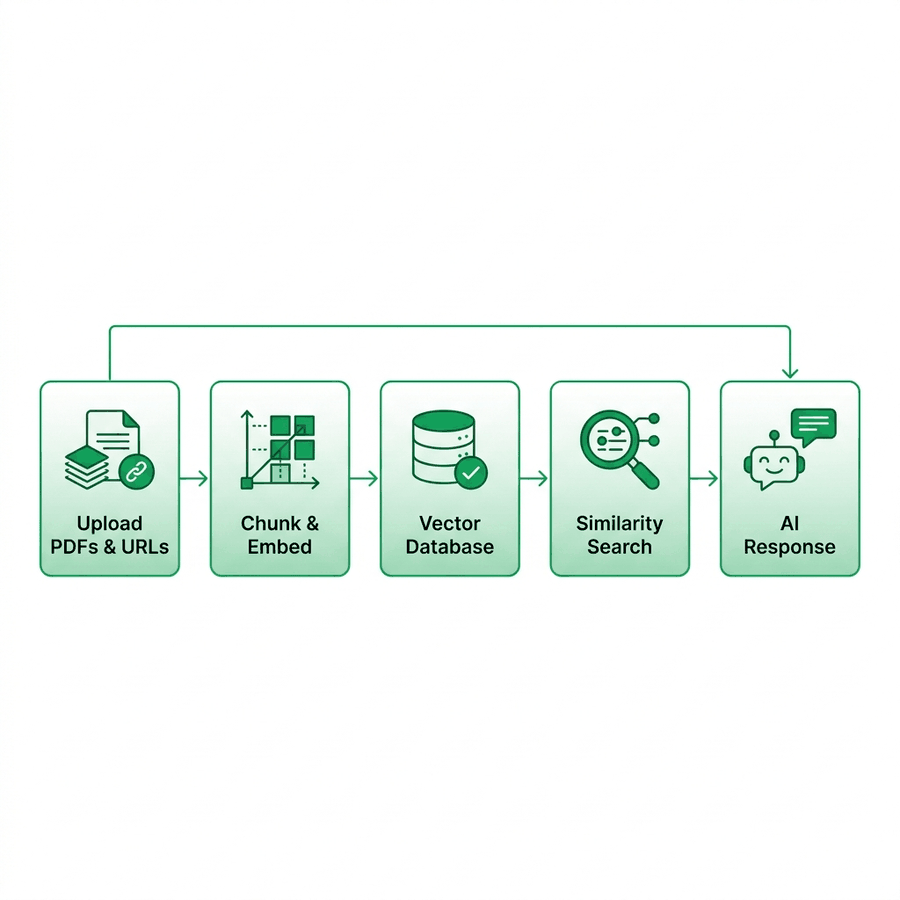
Here's what actually happens when you upload documents to Growbro:
-
Document ingestion. You upload your PDFs, Word docs, or spreadsheets through the dashboard. Or you paste in your website URL and we crawl it automatically. We currently support up to 50 URLs per agent and unlimited document uploads.
-
Chunking. Our backend splits your content into overlapping segments of roughly 500–800 tokens each. The overlap ensures that context isn't lost at chunk boundaries.
-
Vectorization. Each chunk gets converted into a high-dimensional embedding vector using a production embedding model. These vectors capture the semantic meaning of your content, not just the keywords.
-
Storage. The vectors go into a vector database (specifically Pinecone) indexed by your agent ID. When a customer asks a question, we embed their query, perform a similarity search against your vectorized content, and retrieve the top 3-5 most relevant chunks.
-
Generation. Those chunks get injected into the LLM's context alongside your agent's personality settings and conversation rules. The model generates a response grounded in your actual documentation.
The entire process — from uploading a 50-page PDF to having a working agent — takes under 5 minutes.
The "Direct Answer Only" mode (and why it matters)
This is probably the most underappreciated feature we built. Here's the problem: LLMs are confidently creative. If your pricing PDF says a deluxe package costs $500 but a customer asks about a "premium tier" that doesn't exist, a generic AI tool might cheerfully invent pricing for it.
That's a lawsuit waiting to happen.
So we built a strict mode called "Direct Answer Only." When enabled, the AI only responds using information it can ground in your uploaded documents and scraped pages. If the customer asks something that isn't covered in your knowledge base, the AI responds honestly:
"I don't have specific information about that in my current knowledge base. Let me connect you with our team who can help — would you like me to do that?"
No hallucination. No fabricated policies. In regulated industries like finance, healthcare, or insurance, this single toggle is often the deciding factor for adopting AI support.
Real results from our own deployment
When we ate our own dog food and deployed this on Growbro's own support channels, here's what we observed over 30 days:
- Total incoming questions: ~1,400
- Resolved autonomously by AI: ~1,036 (74%)
- Escalated to human team: ~364 (26%)
- Average AI response time: 2.8 seconds
- Average human response time (before AI): 22 minutes
- False/incorrect responses caught in review: 8 (0.7% error rate)
The 26% that escalated to humans were exactly the conversations that should involve a human — billing disputes, account-specific configuration questions, and partnership inquiries. The AI correctly identified these as outside its knowledge scope and routed them cleanly.
How we teach the AI your specific voice
Accuracy is table stakes. But customers also notice when a response "sounds wrong" — too formal for a casual brand, too chatty for an enterprise product.
In the dashboard, there's a Conversation Style section where you can provide:
- Hard limitations: Rules the AI must always follow. Example: "Never offer discounts. Never discuss competitor products. Always recommend scheduling a demo for enterprise inquiries."
- Response examples: Sample user/assistant exchanges that set the baseline tone. You provide 3-5 example conversations showing how you'd ideally respond, and the model calibrates its output accordingly.
This isn't fine-tuning in the traditional ML sense — it's structured few-shot prompting. But in practice, it works remarkably well. We've had customers tell us they can't distinguish the AI's responses from their senior support reps.
Where the captured data goes
Every conversation the AI handles generates structured data. Beyond resolving the query, the agent is configured to naturally collect contact information — names, emails, phone numbers, company names — as part of the conversational flow.
These leads flow directly into the Growbro CRM, tagged with the source channel and the specific AI agent that handled them. From there, you can configure automatic syncing to:
- Google Sheets — for teams that want a simple, shared spreadsheet of all captured leads updated in real-time.
- HubSpot CRM — for sales teams that need leads pushed directly into their existing pipeline and deal stages.
No CSV exports. No manual data entry.
Is this for every business?
Honestly, no. If you get fewer than 20 support queries per week, a Notion FAQ page and a personal WhatsApp might serve you fine. The ROI of AI support kicks in when you're handling volume — when the same 15 questions are eating hours of your team's day, when international customers are messaging at 3 AM, when scaling your support team linearly with your user base would bankrupt you.
If that sounds like your situation, upload your docs to growbro.ai and see what your agent looks like in 5 minutes. No credit card required for the trial.